

Published: 15 October 2026
Updated: 15 October 2026
Audits are useful only if the issues they identify are followed through to an effective conclusion. Recording a non-conformance is the beginning of the process.
The real challenge is making sure that corrective actions are assigned, completed on time, supported by evidence and properly verified before the issue is closed.
This becomes increasingly difficult when an organisation is managing multiple audits, sites, departments and action owners at the same time. A simple list of outstanding actions can quickly become difficult to control.
Effective audit corrective action tracking creates a clear link between the original audit, the non-conformance raised, the action required and the evidence that demonstrates the problem has been addressed.
What Is Audit Corrective Action Tracking?
Audit corrective action tracking is the process of managing actions raised as a result of an audit from initial identification through to verified closure.
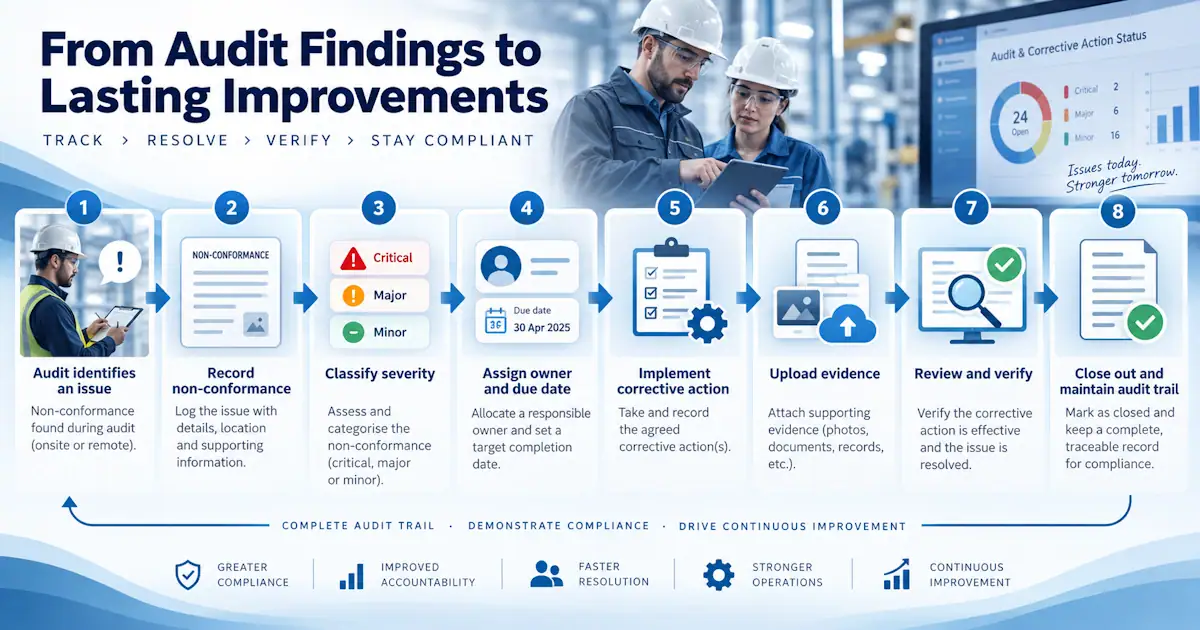
A typical process might include:
- The audit identifies a non-conformance.
- The non-conformance is classified according to its significance.
- One or more corrective actions are created.
- Each action is assigned to an owner.
- A target completion date is agreed.
- Progress is monitored.
- Evidence is submitted when the action is complete.
- The evidence is reviewed.
- The action and non-conformance are formally closed when the required conditions have been met.
Many organisations refer to the issues raised during an audit as audit findings. In Pisys Audits they are managed as non-conformances and can be categorised as Critical, Major or Minor.
The terminology may differ between organisations, but the underlying requirement is the same: there must be a clear, traceable route from identifying a problem to demonstrating that it has been properly resolved.
Learn more about the broader Audit Management process.
Why Corrective Actions Need to Be Tracked Separately
A non-conformance describes what is wrong. A corrective action describes what needs to be done about it.
Those are related records, but they are not the same thing.
A single non-conformance may require several actions. For example, an audit might identify that a maintenance procedure is not being followed consistently.
Corrective actions could include updating the procedure, retraining personnel, changing a checklist and reviewing previous maintenance records.
Closing one of those actions does not necessarily mean the original non-conformance can be closed.
Separating the issue from the actions required to resolve it makes it much easier to see whether the underlying problem has genuinely been addressed.
Assign Clear Ownership
Every corrective action should have a named owner.
Without clear ownership, actions tend to become shared responsibilities, which can easily become nobody's responsibility.
The action owner should understand:
- What needs to be done.
- Why the action has been raised.
- What evidence will be required.
- When the action is due.
- Who will review or approve completion.
Where appropriate, responsibility for the action and responsibility for verifying it should also be separated.
This provides an additional level of assurance and reduces the risk of actions being closed simply because someone has marked them complete.
Set Realistic Due Dates
Every corrective action should have a target completion date.
Due dates make it possible to distinguish between actions that are progressing normally and those that require attention.
However, deadlines should reflect the significance of the issue.
A Critical non-conformance may require immediate action, while a Minor non-conformance may reasonably be addressed as part of a planned improvement programme.
The important point is that the deadline is recorded, visible and monitored.
If the due date changes, the reason for the change should also become part of the audit trail rather than simply overwriting the original date.
Use Clear Action Statuses
A simple open and closed status is often not enough.
An effective corrective action workflow may need to distinguish between stages such as:
- Open.
- Assigned.
- In progress.
- Awaiting evidence.
- Submitted for review.
- Rejected or returned.
- Verified.
- Closed.
The exact status names are less important than having a consistent process.
Statuses make it possible to see not only how many actions remain outstanding, but also where they are becoming stuck.
For example, an organisation may discover that actions are generally completed on time but spend too long waiting for verification.
That is a different management problem from actions that are never completed in the first place.
Track Evidence Alongside the Action
Evidence provides the link between saying that something has been done and demonstrating that it has been done.
Depending on the action, evidence could include photographs, revised procedures, training records, inspection reports, certificates, screenshots or other supporting documents.
Keeping evidence attached to the action creates a much stronger record than storing it separately in email, shared folders or individual spreadsheets.
It also makes future audits easier because reviewers can see what was done, when it was done and what evidence supported the decision to close the action.
Do Not Treat Complete and Closed as the Same Thing
One of the most important distinctions in corrective action tracking is the difference between completion and closure.
An action owner may have completed the work requested, but somebody may still need to verify that the work is adequate.
For example, an action to revise a procedure could be marked complete when the revised document is submitted.
Closure should occur only after the reviewer has checked that the revised procedure actually addresses the original non-conformance.
This additional verification step prevents weak or incomplete actions being accepted simply because the task has been carried out.
Escalate Overdue Corrective Actions
Corrective actions are easy to lose sight of when they are managed across multiple audits.
A good tracking process should make overdue actions immediately visible.
Escalation might include reminders to the action owner, notifications to managers or inclusion in management dashboards and reports.
The purpose is not simply to chase people. Repeated 'action overdue' emails can lead to overwhelm and a drop in performance.
Repeatedly overdue actions can indicate broader problems such as inadequate resources, unrealistic deadlines, unclear ownership or actions that have not been properly defined.
Tracking overdue actions therefore provides useful management information as well as improving individual action closure.
Keep a Complete Audit Trail
Corrective action tracking should preserve the history of each action.
That may include:
- Who created it.
- Who it was assigned to.
- The original due date.
- Changes to ownership.
- Changes to deadlines.
- Comments and progress updates.
- Evidence submitted.
- Evidence rejected.
- Approval or verification activity.
- The date of final closure.
This history can be important during subsequent audits, external inspections or regulatory reviews.
It also allows an organisation to understand how the issue was managed rather than seeing only its final status.
Track Corrective Actions Across Multiple Audits
The difficulty increases substantially when corrective actions are managed across several audits.
An HSE manager may need to oversee actions arising from internal audits, external audits, site inspections, compliance reviews and operational assessments at the same time.
Managing each audit separately can make it difficult to obtain an organisation-wide view.
A central corrective action register allows managers to see actions across audits and filter them by factors such as owner, site, priority, due date, audit type or status.
This is particularly important for multi-site organisations where the same type of issue may be appearing in several locations.
Look for Patterns, Not Just Individual Actions
Corrective action data becomes more useful as the history grows.
Instead of asking only whether individual actions have been closed, organisations can begin looking for patterns.
For example:
- Which types of non-conformance occur most frequently?
- Which sites generate the most overdue actions?
- Which departments take longest to close corrective actions?
- Are Critical or Major non-conformances recurring?
- Are certain audit questions repeatedly producing problems?
- Are actions being rejected during verification?
This moves audit management beyond simple compliance and towards continuous improvement.
Repeated non-conformances can also suggest that previous corrective actions dealt with symptoms rather than the underlying cause.
Why Spreadsheets Become Difficult for Corrective Action Tracking
Spreadsheets can work when the number of actions is small.
Problems usually appear as the volume and complexity increase:
- Different versions of the spreadsheet may circulate.
- Evidence may be stored somewhere else.
- Reminders depend on individuals.
- Changes to dates or ownership may overwrite the previous information.
- Several people may need to update the file simultaneously.
- Reporting across multiple audits becomes time consuming.
- It can also become difficult to demonstrate exactly who changed something and when.
Dedicated audit management software is designed to maintain the relationship between the audit, the non-conformance, the corrective action and the evidence required for closure.
How Audit Software Supports Corrective Action Tracking
An audit management system can provide a central workflow for managing corrective actions from creation to closure.
Instead of maintaining separate audit reports, spreadsheets, emails and evidence folders, the information remains connected.
A system such as Pisys Audits can be used to manage audits and checklists, record non-conformances, assign corrective actions, monitor deadlines and retain the evidence and history associated with each action.
That gives both action owners and managers a clearer view of what remains outstanding and why.
It also provides a defensible record showing how issues identified during audits were addressed.
Corrective Action Tracking Is Part of the Wider Audit Process
Corrective action tracking should not be treated as an isolated administrative task.
It sits within a wider audit management process that begins with planning and conducting the audit and continues through non-conformance management, corrective action, verification and final closure.
The objective is not simply to reduce the number of open actions.
It is to ensure that the organisation can demonstrate that issues identified through auditing have been properly understood, addressed and verified.
A strong corrective action process therefore turns audit results into measurable improvement rather than allowing them to become another list of outstanding tasks.
Frequently Asked Questions
What is corrective action tracking in an audit?
Corrective action tracking is the process of monitoring actions raised following an audit from assignment through completion, evidence review, verification and closure.
Who should own an audit corrective action?
Each corrective action should have a clearly identified owner responsible for completing the required work. Verification or approval may be carried out by a different person.
When should a corrective action be closed?
An action should normally be closed only when the required work has been completed and any necessary evidence has been reviewed and accepted.
What information should be recorded against a corrective action?
Typical information includes the action description, owner, due date, status, priority, comments, evidence, approval history and closure date.
How can organisations track corrective actions from several audits?
A central audit management system allows actions from multiple audits, sites and departments to be viewed together and filtered by owner, status, due date, priority or other criteria.